Building Microservices with NestJS: Architecture and Patterns
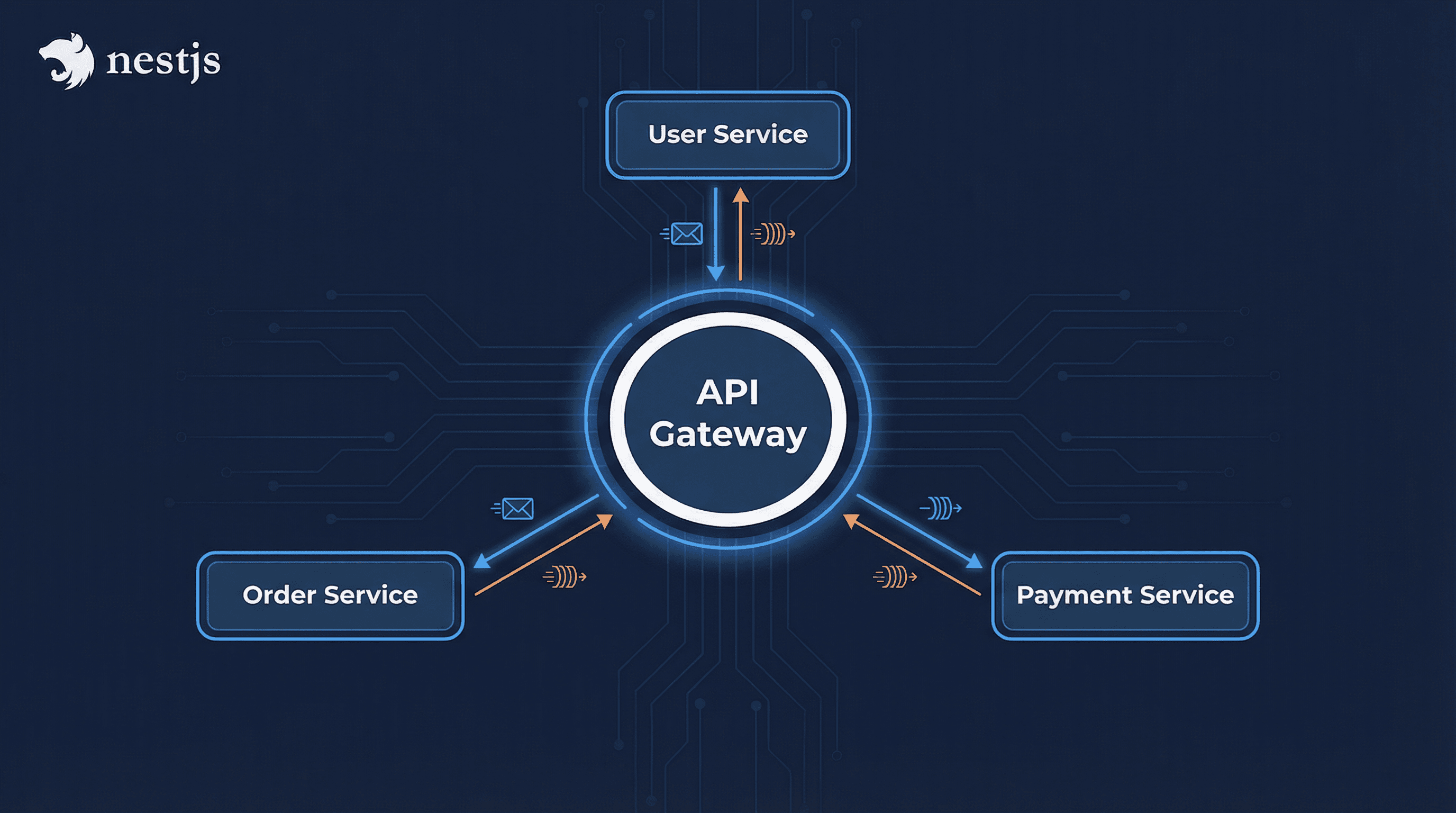
Microservices architecture breaks applications into small, independent services that communicate over well-defined APIs. NestJS provides excellent support for building microservices with built-in transporters, message patterns, and service discovery. This article explores how to build scalable microservices with NestJS.
Understanding Microservices
Benefits
- Scalability: Scale services independently
- Technology Diversity: Use different tech stacks per service
- Fault Isolation: Failures don't cascade
- Team Autonomy: Teams can work independently
- Deployment Flexibility: Deploy services independently
Challenges
- Complexity: More moving parts
- Network Latency: Inter-service communication overhead
- Data Consistency: Distributed transactions
- Testing: More complex testing scenarios
- Monitoring: Need distributed tracing
NestJS Microservices Setup
1. Install Dependencies
npm install @nestjs/microservices
npm install @nestjs/platform-rmq  # RabbitMQ
# or
npm install @nestjs/platform-redis # Redis
# or
npm install @nestjs/platform-kafka # Kafka
2. Create Microservice
// main.ts (User Service)
import { NestFactory } from '@nestjs/core';
import { MicroserviceOptions, Transport } from '@nestjs/microservices';
import { AppModule } from './app.module';

async function bootstrap() {
  const app = await NestFactory.createMicroservice<MicroserviceOptions>(AppModule, {
    transport: Transport.RMQ,
    options: {
      urls: ['amqp://localhost:5672'],
      queue: 'user_queue',
      queueOptions: {
        durable: true,
      },
    },
  });

  await app.listen();
  console.log('User microservice is listening');
}
bootstrap();
Communication Patterns
1. Message-Based (RabbitMQ)
// user.service.ts
import { Injectable, Inject } from '@nestjs/common';
import { ClientProxy } from '@nestjs/microservices';

@Injectable()
export class UserService {
  constructor(@Inject('NOTIFICATION_SERVICE') private notificationClient: ClientProxy) {}

  async createUser(userData: CreateUserDto) {
    const user = await this.userRepository.create(userData);

    // Send message to notification service
    this.notificationClient.emit('user_created', {
      userId: user.id,
      email: user.email,
    });

    return user;
  }
}
2. Request-Response Pattern
// user.controller.ts
import { Controller, Get, Param, Inject } from '@nestjs/common';
import { ClientProxy } from '@nestjs/microservices';
import { firstValueFrom } from 'rxjs';

@Controller('users')
export class UserController {
  constructor(@Inject('ORDER_SERVICE') private orderClient: ClientProxy) {}

  @Get(':id/orders')
  async getUserOrders(@Param('id') id: string) {
    // Request-response pattern
    const orders = await firstValueFrom(this.orderClient.send('get_user_orders', { userId: id }));
    return orders;
  }
}
3. Event-Based Pattern
// order.service.ts
import { Injectable } from '@nestjs/common';
import { EventPattern, Payload } from '@nestjs/microservices';

@Injectable()
export class OrderService {
  @EventPattern('user_created')
  async handleUserCreated(@Payload() data: { userId: string; email: string }) {
    // Handle user created event
    console.log('User created:', data);
    // Create welcome order, etc.
  }

  @EventPattern('order_placed')
  async handleOrderPlaced(@Payload() data: OrderData) {
    // Process order
  }
}
API Gateway
Setup API Gateway
// main.ts (API Gateway)
import { NestFactory } from '@nestjs/core';
import { AppModule } from './app.module';

async function bootstrap() {
  const app = await NestFactory.create(AppModule);

  // Connect to microservices
  app.connectMicroservice({
    transport: Transport.RMQ,
    options: {
      urls: ['amqp://localhost:5672'],
      queue: 'user_queue',
    },
  });

  await app.startAllMicroservices();
  await app.listen(3000);
}
bootstrap();
Gateway Controller
// gateway.controller.ts
import { Controller, Get, Post, Body, Inject } from '@nestjs/common';
import { ClientProxy } from '@nestjs/microservices';
import { firstValueFrom } from 'rxjs';

@Controller()
export class GatewayController {
  constructor(
    @Inject('USER_SERVICE') private userClient: ClientProxy,
    @Inject('ORDER_SERVICE') private orderClient: ClientProxy,
  ) {}

  @Get('users/:id')
  async getUser(@Param('id') id: string) {
    return firstValueFrom(this.userClient.send('get_user', { id }));
  }

  @Post('orders')
  async createOrder(@Body() orderData: CreateOrderDto) {
    // Get user first
    const user = await firstValueFrom(this.userClient.send('get_user', { id: orderData.userId }));

    // Create order
    const order = await firstValueFrom(
      this.orderClient.send('create_order', {
        ...orderData,
        userEmail: user.email,
      }),
    );

    return order;
  }
}
Service Discovery
Using Consul
// app.module.ts
import { Module } from '@nestjs/common';
import { ClientsModule, Transport } from '@nestjs/microservices';

@Module({
  imports: [
    ClientsModule.register([
      {
        name: 'USER_SERVICE',
        transport: Transport.CONSUL,
        options: {
          host: 'localhost',
          port: 8500,
          service: 'user-service',
        },
      },
    ]),
  ],
})
export class AppModule {}
Database per Service
Pattern Implementation
// user.module.ts (User Service)
@Module({
  imports: [
    TypeOrmModule.forRoot({
      type: 'postgres',
      host: process.env.USER_DB_HOST,
      database: 'user_db',
      // ... user service database config
    }),
    TypeOrmModule.forFeature([User]),
  ],
})
export class UserModule {}// order.module.ts (Order Service)
@Module({
imports: [
TypeOrmModule.forRoot({
type: 'postgres',
host: process.env.ORDER_DB_HOST,
database: 'order_db',
// ... order service database config
}),
TypeOrmModule.forFeature([Order]),
],
})
export class OrderModule {}Distributed Transactions
Saga Pattern
// order.saga.ts
import { Injectable } from '@nestjs/common';
import { CommandBus, EventBus } from '@nestjs/cqrs';

@Injectable()
export class OrderSaga {
  constructor(
    private commandBus: CommandBus,
    private eventBus: EventBus,
  ) {}

  @Saga()
  orderCreated = (events$: Observable<any>): Observable<ICommand> => {
    return events$.pipe(
      ofType(OrderCreatedEvent),
      map((event) => {
        // Step 1: Reserve inventory
        return new ReserveInventoryCommand(event.orderId);
      }),
      // Step 2: Process payment
      switchMap((command) =>
        this.commandBus.execute(command).pipe(map(() => new ProcessPaymentCommand(command.orderId))),
      ),
      // Step 3: Ship order
      switchMap((command) => this.commandBus.execute(command).pipe(map(() => new ShipOrderCommand(command.orderId)))),
    );
  };
}
Error Handling
Global Exception Filter
// rpc-exception.filter.ts
import { Catch, RpcExceptionFilter, ArgumentsHost } from '@nestjs/common';
import { Observable, throwError } from 'rxjs';
import { RpcException } from '@nestjs/microservices';

@Catch(RpcException)
export class ExceptionFilter implements RpcExceptionFilter<RpcException> {
  catch(exception: RpcException, host: ArgumentsHost): Observable<any> {
    return throwError(() => ({
      status: 'error',
      message: exception.getError(),
    }));
  }
}
Monitoring and Logging
Distributed Tracing
// tracing.interceptor.ts
import { Injectable, NestInterceptor, ExecutionContext, CallHandler } from '@nestjs/common';
import { Observable } from 'rxjs';
import { tap } from 'rxjs/operators';

@Injectable()
export class TracingInterceptor implements NestInterceptor {
  intercept(context: ExecutionContext, next: CallHandler): Observable<any> {
    const request = context.switchToRpc().getData();
    const traceId = request.traceId || this.generateTraceId();

    console.log(`[${traceId}] Processing request:`, request.pattern);

    return next.handle().pipe(
      tap({
        next: (data) => console.log(`[${traceId}] Success`),
        error: (error) => console.error(`[${traceId}] Error:`, error),
      }),
    );
  }

  private generateTraceId(): string {
    return Math.random().toString(36).substring(7);
  }
}
Health Checks
Service Health
// health.controller.ts
import { Controller, Get } from '@nestjs/common';
import { HealthCheck, HealthCheckService } from '@nestjs/terminus';

@Controller('health')
export class HealthController {
  constructor(private health: HealthCheckService) {}

  @Get()
  @HealthCheck()
  check() {
    return this.health.check([() => this.checkDatabase(), () => this.checkRedis()]);
  }

  private async checkDatabase() {
    // Check database connection
    return { database: { status: 'up' } };
  }

  private async checkRedis() {
    // Check Redis connection
    return { redis: { status: 'up' } };
  }
}
Best Practices
1. Service Boundaries
Define clear service boundaries:
- User Service: Authentication, user management
- Order Service: Order processing, payment
- Inventory Service: Stock management
- Notification Service: Email, SMS, push notifications
2. API Versioning
@Controller('api/v1/users')
export class UserController {
  // Version 1 endpoints
}
3. Circuit Breaker
import { CircuitBreaker } from 'opossum';

const options = {
  timeout: 3000,
  errorThresholdPercentage: 50,
  resetTimeout: 30000,
};

const breaker = new CircuitBreaker(serviceCall, options);

breaker.on('open', () => console.log('Circuit breaker opened'));
4. Rate Limiting
import { ThrottlerModule } from '@nestjs/throttler';

@Module({
  imports: [
    ThrottlerModule.forRoot({
      ttl: 60,
      limit: 10,
    }),
  ],
})
export class AppModule {}
Conclusion
Building microservices with NestJS requires careful architecture design, proper communication patterns, and robust error handling. By leveraging NestJS's microservices support, message patterns, and distributed systems patterns, you can create scalable, maintainable microservices architectures. Remember to implement proper monitoring, health checks, and circuit breakers for production readiness.